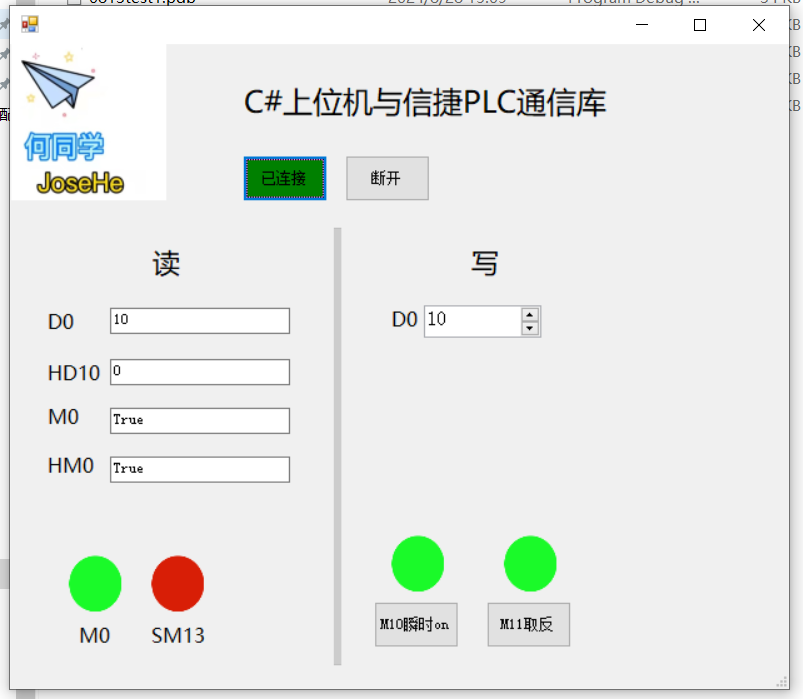
 核心是信捷的通信dll:
 案例用vs打开,代码部分如下:
案例下载: 通信类-0828 C sharp与信捷modbus tcp通信案例.zip
C#
// 在这里输入代码
using System;
using System.Collections.Generic;
using System.ComponentModel;
using System.Data;
using System.Drawing;
using System.Linq;
using System.Text;
using System.Threading.Tasks;
using System.Windows.Forms;
using ModbusCom;
namespace _0813test1
{
    public partial class FormModbusTcp : Form
    {

        public FormModbusTcp()
        {
            InitializeComponent();
            this.button_close.Enabled = false;

        }

        //string on_pic_path = "E:\\buttons_PNG93.png";
        //string off_pic_path = "E:\\buttons_PNG94.png";
        //  ModbusTcp MTcpObj = new ModbusTcp("10.168.2.100",502);//标准协议只能用D M
        MTcpExtend MTcpObj = new MTcpExtend("192.168.6.4");//扩展协议可以用HD HM

        //MTcpObj.Port = 502;

        private void button2_connect_Click(object sender, EventArgs e)
        {
            MTcpObj.Connect();

            this.button2_connect.Text = "已连接";
            this.button2_connect.BackColor = Color.Green;
            this.button_close.Enabled = true;
        }
        private void button_close_Click(object sender, EventArgs e)
        {
            MTcpObj.Dispose();
            this.button2_connect.Text = "连接";
            this.button2_connect.BackColor = Color.Transparent;
        }
        private void timer1_Tick(object sender, EventArgs e)
        {


            if (MTcpObj.IsConnect)

            {
                //读D
                Result<short[]> result1 = MTcpObj.ReadRegsShort(ComObjType.D, 0, 1);
                textBox1.Text = Convert.ToString(result1.Content[0]);
                if(!this.numericUpDown1.Focused)//没有聚焦才更新值
                {
                 numericUpDown1.Value = Convert.ToInt16(result1.Content[0]);
                }
                //读HD
                Result<short[]> result2 = MTcpObj.ReadRegsShort(ComObjType.HD, 10, 1);
                textBox2.Text = Convert.ToString(result2.Content[0]);
                //读M
                Result<bool[]> result3 = MTcpObj.ReadCoil(ComObjType.M, 0, 1);
                textBox3.Text = Convert.ToString(result3.Content[0]);
                //读HM

                Result<bool[]> result4 = MTcpObj.ReadCoil(ComObjType.HM, 0, 1);
                textBox4.Text = Convert.ToString(result4.Content[0]);

                //读SM13
                Result<bool[]> result5 = MTcpObj.ReadCoil(ComObjType.SM, 13, 1);
              //  textBox3.Text = Convert.ToString(result5.Content[0]);
                //写D
                //--写寄存器操作,可以指定数据的写入格式--
                //ushort[] writeushort1 = new ushort[40];
                //inc2 += 1;
                //writeushort1[0] = inc2;
                //writeushort1[1] += 2;
                //writeushort1[2] = 6666;
                //writeushort1[3] = 8888;
                //Result result5 = MTcpObj.WriteRegsUShort(300, writeushort1);

                //  MTcpObj.Dispose();

                if (result5.Content[0])
                {

                    pictureBoxSM13.Image = Properties.Resources.red3;

                }
                else
                {
                    pictureBoxSM13.Image = Properties.Resources.green3;
                }

            }
            else return;
        }


        private void numericUpDown1_KeyDown(object sender, KeyEventArgs e)
        {
            write1();
        }
        private void numericUpDown1_ValueChanged(object sender, EventArgs e)
        {
            write1();
        }

        public  void  write1()
        {
            short aaaa = 0;
            short[] writeushort1 = new short[40];
            aaaa = Convert.ToInt16(this.numericUpDown1.Value);

            if (aaaa > -32768 && aaaa < 32767)
            {
                writeushort1[0] = aaaa;
            }
            else
            {
                writeushort1[0] = 0;
            }

            Result result5 = MTcpObj.WriteRegsShort(ComObjType.D, 0, writeushort1);


        }
        private void button_M10_MouseDown(object sender, MouseEventArgs e)
        {
            bool[] write_M = new bool[1];
            write_M[0] = true;
            Result result6 = MTcpObj.WriteCoil(ComObjType.M, 10, write_M);
            if(result6.IsSuccess)
            {
            pictureBox2.Image = Properties.Resources.red3;
            }
        }

        private void button_M10_MouseUp(object sender, MouseEventArgs e)
        {
            bool[] write_M = new bool[1];
            write_M[0] = false;
            Result result6 = MTcpObj.WriteCoil(ComObjType.M, 10, write_M);
            if (result6.IsSuccess)
            {
                pictureBox2.Image = Properties.Resources.green3;
            }
        }

        bool invert = false;
        private void button1_M11_Click(object sender, EventArgs e)
        {
            bool[] write_M = new bool[1];
            invert = !invert;
            write_M[0] = invert;
            Result result6 = MTcpObj.WriteCoil(ComObjType.M, 11, write_M);
            if (result6.IsSuccess)
            {
                if (invert)
                {
                    pictureBox3.Image = Properties.Resources.red3;
                }
                else
                {
                    pictureBox3.Image = Properties.Resources.green3;
                }
            }
        }

}
评论
发表评论
请先登录后再发表评论
评论列表